 Support Center
<- Back to Main Page
Tags: install
Add Forms to a Return
📚 What This Guide Covers
This guide demonstrates the simple process of adding new forms (such as W-2s, Schedule Es, etc.) to an active tax return in SureFire.
📊 Step-by-Step Guide
Step 1: Open the Form List
The Form List contains all available tax documents for the current return type.
While working within a return, select the Add Form/Display Form List button from the toolbar.
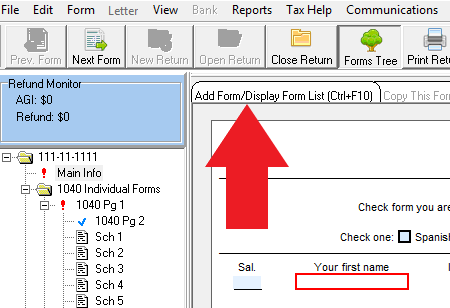
Step 2: Find Your Form
Search for the specific document you need to add.
In the Find A Form window, you have two options:
- Scroll through the alphabetical list.
- Use the Look For search field on the left to type the name or number of the form.
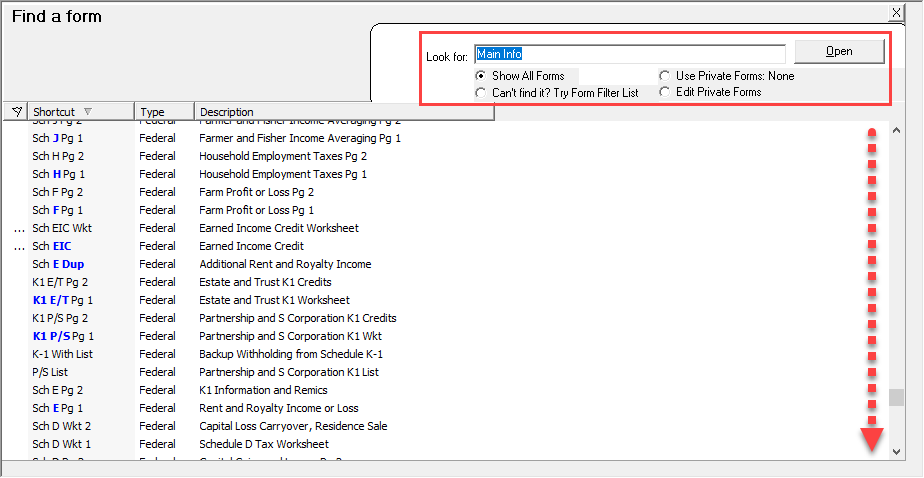
Step 3: Add to Return
Insert the form into your current client file.
Once you have located and highlighted the correct form, simply double-click it to add it to the return.

📞 Still Need Help?
If you cannot find the form you are looking for, contact our support team:
Phone: 1-800-516-9442
Tags: install