 Support Center
Common E-File Validation Errors
🔍 Common E-File Validation Errors
Reading Validation Errors:
After you run Diagnostics, the first errors displayed are electronic filing errors.
These errors are displayed in red, hyperlinked text. Click the link to jump to the affected form and entry. There, you can correct the problem and run diagnostics again.
Once e-file errors are cleared, validation errors can occur in the diagnostics window.
⚠️ Before You Begin
Use the diagnostics window links to find the exact field that needs attention.
- The error begins with wording that appears like a web address (“http://www.irs.gov/efile”). Ignore the web address in the error.
- ‘Element’ means a field on that particular form.
- ‘The value’ means the entry that you typed in that field or that calculated into that field
📊 How to Read and Fix Validation Errors
Step 1: Click the red, hyperlinked error
Use this when you need to jump directly to the problem field.
- Click the link to jump to the affected form and entry.
- There, you can correct the problem and run diagnostics again.
- If the link doesn't automatically jump you to the error, you will need to manually navigate to the error.
Step 2: Understand the error message parts
Use this when you want to know what part of the message tells you what to fix.
- Refer to this example validation error:
'http://www.irs.gov/efile:OtherExpenseDescription' element is invalid - "The value" is invalid according to its datatype 'http://www.irs.gov/efile:ShortDescriptionType' - The Pattern constraint failed.- This section of the error, ‘OtherExpenseDescription', refers to the field of the form that contains the invalid entry
- ‘The value’ section of the error refers to the text typed into that particular field
✅ Tip: Watch for punctuation
NOTE: A large portion of validation errors are punctuation. Be sure to check for stray periods, hyphens or quotes in a field.
❌ Common Validation Errors and Fixes
Validation Error:
The 'http://www.irs.gov/efile:AddressLine1Txt' element is invalid - The value '' is invalid according to its datatype 'http://www.irs.gov/efile:StreetAddressType' - The Pattern constraint failed.
The 'http://www.irs.gov/efile:CityNm' element is invalid - The value '' is invalid according to its datatype 'http://www.irs.gov/efile:CityType' - The Pattern constraint failed.
The 'http://www.irs.gov/efile:ZIPCd' element is invalid - The value '' is invalid according to its datatype 'http://www.irs.gov/efile:ZIPCodeType' - The Pattern constraint failed.
Fix:
We can see that Address Line 1, City, and Zip code are blank. Somewhere on the return, where an address would be filled out, they had put the state, but didn't put address, city, or zip code. This type of issue works for all fields, for example, if CityNm, ZIPCodeType is listed, then this means an address and state are missing from the error message so they would have data entered, but not the City or Zip code.
Validation Error:
The 'http://www.irs.gov/efile:Desc' element is invalid - The value '' is invalid according to its datatype 'http://www.irs.gov/efile:ShortDescriptionType' - The Pattern constraint failed.
Fix:
This is an E-File Validation error that can appear when a return looks perfectly normal. What is actually causing this is somewhere in the return, there are two description fields with the exact name in the Description Name field.
You can fix this by locating the two fields in the return and doing either of the following:
- Combine the two descriptions into one field and combine the figure amounts as well.
- Change the names of the descriptions slightly to make them different in some way.
- From "Description Example, Description Example" to "Description Example 1, Description Example 2".
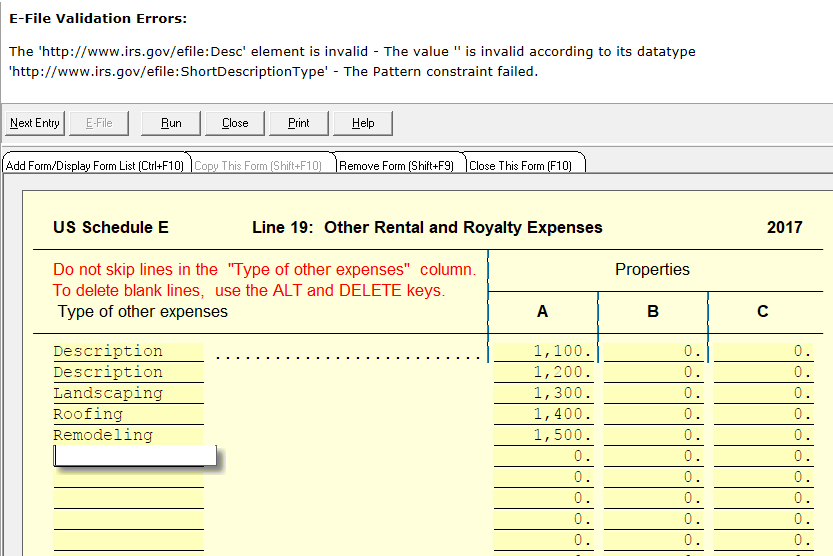
- From "Description Example, Description Example" to "Description Example 1, Description Example 2".
Validation Error:
The element 'IPAddress' in namespace 'http://www.ftb.ca.gov/efile' has incomplete content. List of possible elements expected: 'IPv4AddressTxt, IPv6AddressTxt' in namespace 'http://www.irs.gov/efile'.
To Fix:
The cause for this issue is because you have a bad internet connection. You are most likely using a wireless connection that isn't very strong, or having issues with your current internet connection. Please fix this issue, and try running diagnostics and creating e-file again.
Validation Error:
The 'http://www.irs.gov/efile:ExemptionReasonCd' element is invalid - The value '' is invalid according to its datatype 'String' - The Enumeration constraint failed.
To Fix:
On the 8965 need to put the exemption type at the bottom.
📞 Still Need Help?
If you are having trouble, contact our support team:
Phone: 1-800-516-9442
Tags: diagnostic,federal,form