 Support Center
<- Back to Main Page
Tags: install
Access Violation when Microsoft Edge is open
🔍 Access Violation when Microsoft Edge is open
This article shares two things you can do to resolve the Access Violation issue when Microsoft Edge is open.
⚠️ Before You Begin
Try the options below. If one doesn’t work, move to the next.
🛠️ Step-by-Step Guide
Step 1: Switch your default web browser
Use this when you want to avoid the issue by changing browsers.
Download and install Google Chrome, and then make it your default web browser.
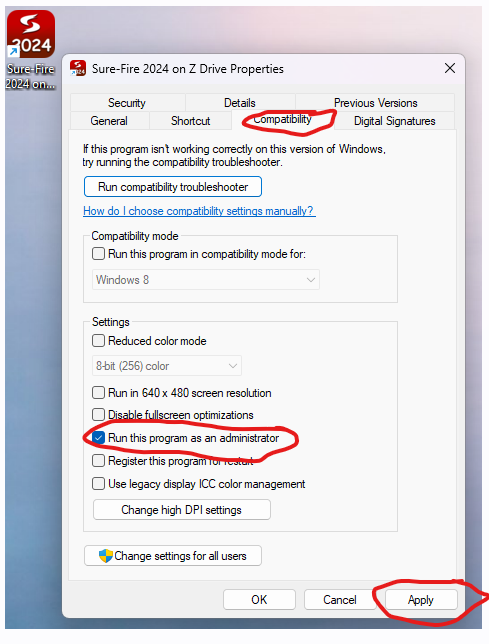
Step 2: Run the program as Administrator
Use this when you need to run the program with elevated permissions.
You can right click on the icon then go under Compatibility Tab and check the box for Run as Administrator, then hit Apply. Then run the program and it won't happen anymore
📞 Still Need Help?
If you are having trouble, contact our support team:
Phone: 1-800-516-9442
Tags: install