 Support Center
Error "DBRepair is currently running. Please wait until it is finished before entering the application"" when opening SureFire"
🔍 Error "DBRepair is currently running. Please wait until it is finished before entering the application" when opening SureFire
This guide will help you resolve the error by removing the stuck database repair file so you can open SureFire again.
⚠️ Before You Begin
Before you start, make sure you know where SureFire is installed so you can navigate to the correct folder.
📊 Step-by-Step Guide
Step 1: Navigate to the SureFire installation drive
Use this when you need to locate the SureFire program files.
Navigate to the drive where SureFire is installed.
Step 2: Open the correct UTSxx folder
Use this when you need to find the folder for the program year you are working with.
Open the UTSxx folder (where xx is theyear of the program you are working with).
Step 3: Delete dbrepair.dat
Use this when you need to remove the stuck repair file.
Delete dbrepair.dat
Step 4: Do NOT delete dbrepair.exe or dbrepair.exe.config
Use this when you need to avoid deleting the wrong files.
Do (Not!) delete dbrepair.exe or dbrepair.exe.config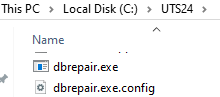
Step 5: Open SureFire
Use this when you are ready to confirm the fix.
You can now open SureFire.
📞 Still Need Help?
If you are having trouble, contact our support team:
Phone: 1-800-516-9442
Tags: diagnostic,install,setup