 Support Center
<- Back to Main Page
Tags: install,setup
How do I run reports in the desktop version of SureFire?
🔍 Title: How do I run reports in the desktop version of SureFire?
This guide shows you how to run reports in the desktop version of SureFire.
⚠️ Before You Begin
You must:
- Log in as Admin or as a user with super user rights.
📊 Step-by-Step Guide
Step 1: Open the Reports List
Use this when you need to find the report you want to run.
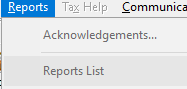
Go to Reports then Reports List.
Step 2: Select the report
Use this when you need to choose which report to run.
Select a report and click OK.
Step 3: (Optional) Customize report criteria
Use this when you need to filter or tailor the report output.
In Report Criteria, you can use filters to customize the report if needed.
Step 4: Run the report
Use this to confirm your selections and generate the report.
Click OK.
📞 Still Need Help?
If you are having trouble, contact our support team:
Phone: 1-800-516-9442
Tags: install,setup