 Support Center
Unable to process selected acknowledments. Database record was not found
❌ Acknowledgment Processing Error
This guide explains how to resolve the "Unable to process selected acknowledgments" error when acknowledgments don't match returns in your SureFire database.
❌ Error Message
"Unable to process selected acknowledgments. Database record was not found for the selected acknowledgment(s). Acknowledgment will remain available until database record is received."
What it means: The IRS/state sent back an acknowledgment for a return that doesn't exist in your SureFire database.
📋 Why This Happens
Common Causes
This error occurs in a few specific situations.
- Multi-computer setup: You e-filed on Computer A, but the acknowledgment arrived on Computer B where the return doesn't exist
- Deleted return: You filed a return, then deleted it from SureFire before the acknowledgment came back
- Corrupted acknowledgment: The acknowledgment file is unreadable or damaged
- Sync issue: The databases on different computers aren't synchronized
📋 How to Fix This Error
Step 1: Understand the Problem
Unfortunately, you cannot determine which SSN/name the acknowledgment belongs to from the error message alone.
The only solution is to delete the orphaned acknowledgment files.
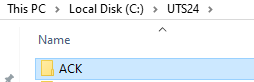
Step 2: Locate the ACK Folder
Find where acknowledgment files are stored on your computer.
- Open "This PC" or "My Computer"
- Navigate to your C: Drive (or whichever drive SureFire is installed on)
- Find the folder: UTSXX\ACK
- XX = last 2 digits of tax year (e.g., UTS16 for 2016)
- Example full path: C:\UTS16\ACK
- Open the ACK folder
Step 3: Identify and Delete Problem Files
Remove the acknowledgment files causing the error.
- Inside the ACK folder, look for files with these extensions:
- .ACKI (Inbound acknowledgment)
- .ACKU (Unprocessed acknowledgment)
- These are the "stuck" acknowledgments
- Right-click on them and select Delete
- Confirm the deletion
✅ Safe to Delete
It is safe to delete stuck acknowledgment files because:
- The matching return no longer exists in your system
- Deleting them won't affect any existing returns
- The IRS keeps records of all acknowledged filings
- You can always look up return status using Return Query
Step 4: Verify in SureFire
After deletion, the error should go away.
- Restart SureFire if it's currently open
- The error message should no longer appear
- Try processing acknowledgments again
⚠️ Important for Multi-Computer Setup
If you use SureFire on multiple computers:
- Make sure the return exists on the computer receiving the acknowledgment
- Keep your databases synchronized between computers
- Process acknowledgments on the same computer where you filed the return
- Consider using SureFire's network backup feature to keep all computers in sync
📋 Prevention Tips
Avoid This Error in the Future
- Don't delete returns immediately: Keep filed returns until acknowledgments arrive (usually 24-48 hours)
- Use one primary computer: File all returns from the same machine to avoid acknowledgment sync issues
- Sync regularly: If using multiple computers, backup and restore your data regularly to keep them synchronized
- Check Return Query: Before deleting a return, verify its status in Return Query to ensure the acknowledgment has been processed
📞 Still Need Help?
If you continue to get this error or are unsure which files to delete, contact our support team:
Phone: 1-800-516-9442
Tags: install,diagnostic