 Support Center
Filling out a Sch. B
🔍 Filling out a Sch. B
This guide shows you how to:
- Follow the steps below - Filling out a Sch. B
⚠️ Before You Begin
You will need access to your Sure-Fire tax software and the return you are working on.
📊 Step-by-Step Guide
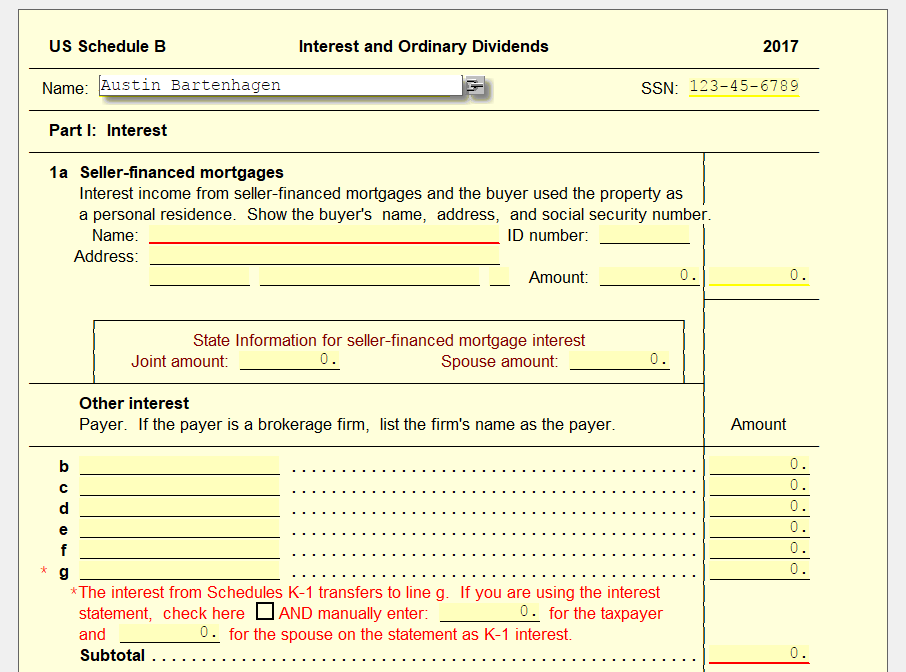
Need to enter Interests and Ordinary Dividends? Not a problem, just link a Sch B to line 9a of the 1040. Directly on the schedule, you can see the locations of entering interest, and if you scroll down a bit, dividends too.
If you need more lines for either of the two listed above, you can link statement sheets to both sections for more spaces. Just click on one of the lines under the section you need it for and select Link, from here select the statement and add it to the return.
Each statement allows you to enter the information directly from either a 1099-INT or DIV respectively.
❌ Common Errors
If something doesn’t show up or looks incorrect, double-check that you linked the right statement lines and try again.
📞 Still Need Help?
If you are having trouble, contact our support team:
Phone: 1-800-516-9442
Tags: federal,form