 Support Center
Unable to Click on E-file Button
🔍 Unable to Click on E-file Button
This guide helps you troubleshoot when the E-file button is grey and you can’t click it after running diagnostics.
⚠️ Before You Begin
You’ll check for program updates, confirm your user permissions (E-Filing privileges), and verify your Registration Code.
📊 Step-by-Step Guide
Step 1: Confirm the program is updated
First, check if your program is updated.
If after you run diagnostics on a return, the E-file button is grey in color and you are unable to click on it, there are a few things that could be wrong. The first thing to check is if you are updated.
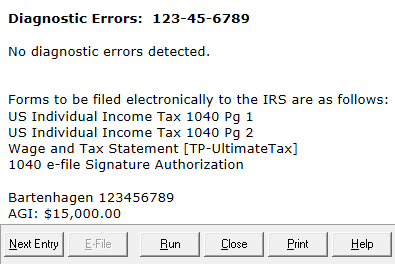
To update the program go to Communications on the main page of the program after logging in, then to Get Program Updates. Ensure to go through the entire update process for the updates to be applied.
Step 2: Check your E-Filing privileges
If that does not fix the issue, the user that you are signed in as may not have E-Filing privileges. To check this:
- Sign in as Admin
- Navigate to Tools>Utilities/Setup Assistant.
- In the Setup Assistant, go to the Groups and Users option on the left, highlight your user and select View/Edit.
- Here, you will be able to see what group your user belongs to. Most users may want to be set to SuperUser to reduce restrictions.
Step 3: Verify the Registration Code (installation)
This issue can also be caused by the program not being able to validate the Registration Code for the installation of the software. To manually do this:
- Sign in as the Admin user
- Go to Tools >Utilities/Setup Assistant
- From the Utility window, select Setup>Setup Assistant
- Enter your EFIN and Registration Code, then click verify.
- After verification, select Save and Close.
Step 4: Contact customer service if it still won’t work
If you are still unable to E-file contact customer service to continue troubleshooting.
📞 Still Need Help?
If you are having trouble, contact our support team:
Phone: 1-800-516-9442
Tags: install,setup