 Support Center
<- Back to Main Page
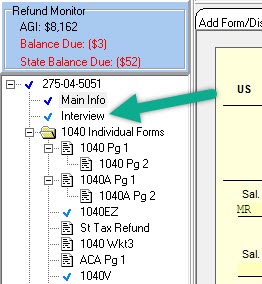
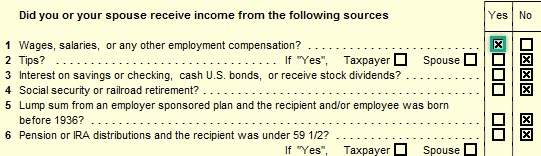
Certain forms are automatically loaded into Sure-Fire cannot be deleted, such as Form 1040, the Main Info Sheet, and Form 6251. If these forms do not have a check or exclamation point, they are not being printed or e-filed with the return.
Tags: federal,form
Cannot Delete Form in 1040 Package
🔍 Cannot Delete Form in 1040 Package
This guide explains why a form can’t be deleted from your return and what you can do to resolve it.
📊 Step-by-Step Guide
Follow these steps:
- Check whether the form was added through the Interview Sheet.
- If certain answers are marked Yes or No, SureFire loads a form into the return for you to complete. You must update the related Interview Sheet answer (or remove the Interview Sheet) before the form can be deleted.
- Look in the Tree for forms that are loaded into memory—these won’t have a check mark beside the form name.
- If a loaded form is no longer being used, change the checkbox to No. The form should then be marked appropriately in your Forms Tree.
- Be aware that some forms can be automatically loaded and can’t be deleted (such as Form 1040, the Main Info Sheet, and Form 6251). If these don’t have a check/exclamation point, they’re not printed or e-filed.
- If the form’s information is linked from another form (for example, the Schedule D or the Schedule EIC), you may need to update the supporting form to ensure the information is actually needed.
Original article content (for reference):
This can occur when a form was added to the return through the Interview Sheet.
When certain answers on the Interview Sheet are marked Yes or No, it causes SureFire to load a form into the return for you to complete. You cannot delete that form from the return until you change the related answer on the Interview Sheet, or remove the Interview Sheet altogether. Forms that are loaded into memory are listed in the Tree, but they have no check mark beside the form name.
You can change the checkbox to No and the form should then be marked with a piece of paper in your Forms Tree. This signifies that the form is no longer being used in the tax return.
Certain forms are automatically loaded into Sure-Fire cannot be deleted, such as Form 1040, the Main Info Sheet, and Form 6251. If these forms do not have a check or exclamation point, they are not being printed or e-filed with the return.
Also, if the form has information that is linked from another form, such as the Schedule D or the Schedule EIC, the information that is flowing to that form makes it be loaded. If this is the case, you need to go to the supporting form and make sure that the information there is needed in the return.
❌ Common Errors
If you still can’t delete the form after updating the Interview Sheet, verify that the form isn’t being loaded automatically or being driven by linked information from another supporting form.
📞 Still Need Help?
If you are having trouble, contact our support team:
Phone: 1-800-516-9442
Tags: federal,form