 Support Center
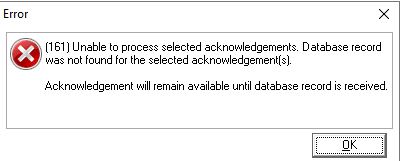
Database Error (161)
🔍 Title: Database Error (161)
This guide explains what this database error means in SureFire Desktop and what to do next.
⚠️ Before You Begin
You may see this error when acknowledgments are being pulled from the wrong computer.
📊 Step-by-Step Guide
Step 1: Check for duplicate software client IDs
The message "Unable to process selected acknowledgments... Database record was not found" is commonly caused by more than one computer being registered with the same software Client ID.
Step 2: Identify which computer has the return
In this situation:
- Computer A. may pull in an acknowledgment for a return that is not located on Computer A.
- Computer B. may hold a return that Computer B will not receive acknowledgments for.
Step 3: Establish a network (with a local technician)
Once a network is established by a local computer technician, SureFire technicians can help with establishing workstations to work alongside the main computer.
Step 4: Contact support if needed
If you are experiencing this error, contact SureFire Customer Support. Customer Support will be able to assist with rehanging the acknowledgments one time per account.
📞 Still Need Help?
If you are having trouble, contact our support team:
Phone: 1-800-516-9442
Tags: install