 Support Center
Linking Forms
📚 What This Guide Covers
This guide explains how to use the Linking feature to move information from one form to another.
⚠️ Before You Begin
Open the form(s) you want to link so you can right-click the appropriate fields.
📊 Step-by-Step Guide
Step 1: Set up Linking
Linking lets information flow through links so you don’t re-enter the same data.
Linking is the function of the software that allows information to flow from one form to another through links. With Linking, you can save time by not entering the same information over and over again. If you know that information that goes on a line would come from another form, try linking to it by doing the following:
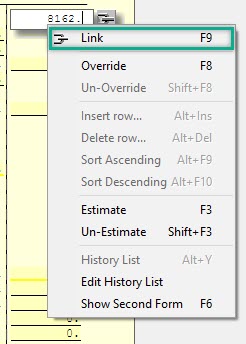
Set up a Link by right-clicking a field on a form, then select Link.
Step 2: Choose the destination
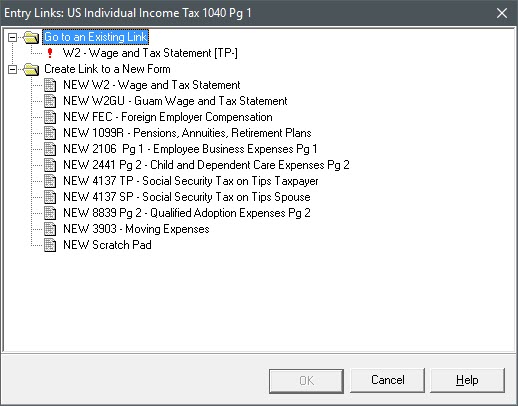
After you click Link, you will be taken to another window that gives you the option of establishing a link to a new form, or to view an existing link.
📞 Still Need Help?
If you are having trouble, contact our support team:
Phone: 1-800-516-9442
Or submit a support ticket: https://surefiretaxsoftware.com/User/NewTicket
Tags: install