 Support Center
<- Back to Main Page
Tags: install,setup
Updating the Registration Code
📚 What This Guide Covers
How to update your Registration Code for SureFire.
⚠️ Before You Begin
You'll need your EFIN and your new registration code.
📊 Step-by-Step Guide
To update the Registration Code
In years 2014 and newer, follow the below steps:
Click Tools at the top of your program window
Select Utilities/Setup Assistant
Click Setup and then Setup Assistant
From here, click on Register Software on the left
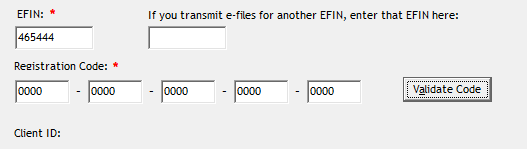
Enter your EFIN and registration code, then click on Validate Registration Code.
For 2013 and prior years, follow the below steps:
On the Tools menu, click Utilities/Setup Options.
In the Sure-Fire Utility, select Setup and then click Setup Options/Assistant.
On the Company tab, enter the new EFIN.
Click Next until you arrive at the Color Setup tab.
Click Finish.
Enter your new Registration Code and then click OK.
❌ Common Errors
If validation fails, confirm the EFIN and registration code match what SureFire issued for your tax year.
📞 Still Need Help?
If you are having trouble, contact our support team:
Phone: 1-800-516-9442
Tags: install,setup