 Support Center
<- Back to Main Page
Tags: install,setup
Increasing the Text Size on Tax Forms
🔍 Increasing the Text Size on Tax Forms
This guide shows you how to increase or decrease the text size on your tax forms.
⚠️ Before You Begin
You will need to have an opened return in SureFire.
📊 Step-by-Step Guide
Step 1: Open your return
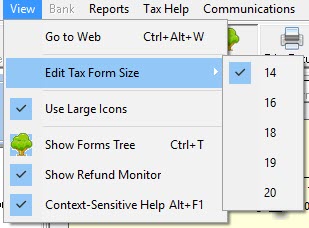
In an opened return, click the View menu.
Step 2: Change the tax form text size
Select Edit Tax Form Size.
Step 3: Choose a size
Select the size of the text and it will update automatically.
📞 Still Need Help?
If you are having trouble, contact our support team:
Phone: 1-800-516-9442
Tags: install,setup