 Support Center
<- Back to Main Page
Tags: install
Delete Pending E-files
📚 What This Guide Covers
This guide explains how to clear out pending e-files that have been created but not yet sent. This is often necessary if you need to make changes to a return after the e-file has already been generated.
📊 Step-by-Step Guide
Step 1: Open Utilities
On the main toolbar, click on Tools and then select Utilities/Setup Assistant.
Step 2: Clear Pending Files
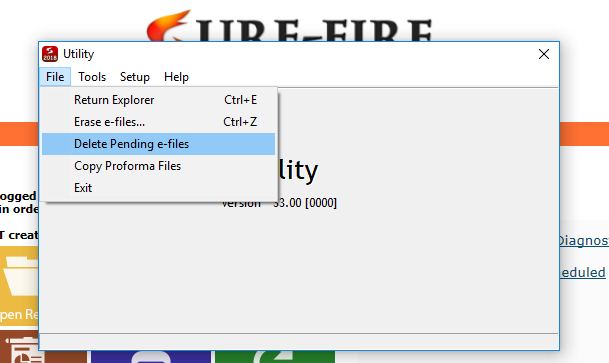
- Within the Utility program, click on the File menu.
- Select Delete Pending e-files from the list.
✅ Next Steps
Once the pending files are deleted, you can return to the tax return, make any necessary adjustments, run diagnostics, and recreate the e-file for transmission.
📞 Still Need Help?
If you are unable to clear a specific pending e-file, contact our support team:
Phone: 1-800-516-9442
Tags: install