 Support Center
Change EFIN
📚 What This Guide Covers
This guide explains the process for updating your Electronic Filing Identification Number (EFIN) within SureFire. This includes submitting documentation, updating software settings, and correcting pending e-files.
⚠️ Mandatory Requirement
Before any software changes can be made, you must provide a copy of your official IRS EFIN letter to SureFire:
- Fax: 1-866-386-5473
Once received, your Software Specialist will update your account, which will generate a new registration code.
📊 Software Update Procedure
Step 1: Update Setup Assistant
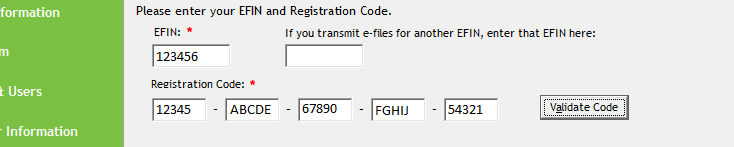
Enter your new EFIN and the new registration code (provided via email and in your Customer Portal) into the Setup Assistant.
Step 2: Update Tax Form Defaults
Ensure the EFIN is also updated in your Tax Form Defaults to ensure all new returns pull the correct number automatically. See this article for detailed instructions.
Step 3: Update Pending E-Files
If you have e-files created but not yet sent, they must be recreated with the new EFIN.
- Open the return with the pending e-file.
- On the Main Info sheet, temporarily change the return type to Paper (this makes the 8879 inactive).
- Right-click on the 8879 in the Forms Tree and select Remove Form.
- Switch the return type back to E-File Only or Bank Products.
- Verify the new 8879 contains the correct EFIN.
- Run diagnostics and create a new e-file to overwrite the previous one.
📞 Still Need Help?
If your registration code is not working or your EFIN update is pending, contact our support team:
Phone: 1-800-516-9442
Tags: install,setup