 Support Center
Restoring Deleted Returns in Install Version
📚 What This Guide Covers
This guide explains how to restore a tax return that has been accidentally deleted from the SureFire Install version. Your data is often recoverable through a simple process on the main dashboard.
📊 Step-by-Step Guide
Step 1: Start a New Return
The restoration process is triggered by attempting to create a return with the same SSN.
From the main dashboard, click on the Start A New Return window.
Step 2: Enter the SSN
The software will detect if a deleted record exists for the SSN you enter.
Type in the Social Security Number (SSN) of the return that was deleted. A system message should appear stating: "This return was previously deleted - would you like to restore the deleted return?"
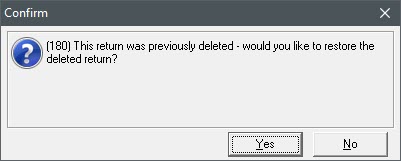
Step 3: Confirm Restoration
Finalize the process to bring back your data.
Click Yes to the prompt. The return will open immediately, restored to the exact state it was in before it was deleted.
✅ Success!
Your return has been restored and is now available for further editing or filing.
📞 Still Need Help?
If the restoration prompt does not appear or you do not have the SSN available, contact our support team:
Phone: 1-800-516-9442
Tags: install